
User's Manual





26_ basic setup
basic setup
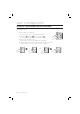
TO SPECIFY THE ALARM OUTPUT PORT FOR THE DISMANTLED DEVICE
Specify the alarm type for the dismantled device. The alarm rings from the dismantlement of the device to the
authentication of the Master Card or a registered card.
Present the Master Card to the device.
Press Button
and Button in sequence and press .
Provide the alarm output port and press
.
The default is set to “02” (alarm).
For the alarm output port settings, refer to the output port table on page 28.
The alarm for the dismantled device occurs regardless of the operation
mode of either Normal or Secure so you simply specify the operation port
only. (To specify the operation port, refer to the operation port settings in
the output port setting table on page 28.)
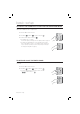
TO OPEN OR CLOSE THE ENTRY DOOR
Follow the step below If you want to keep the door open regardless of the authentication process using the Master
Card or PIN.
Present the Master Card to the device.
Press Button
and Button in sequence and press .
To release opening the door, repeat Step 1 above, select the
< > buttons and press
.
1.
2.
3.
•
•
1.
2.
•
SSA-S2000V
tGj
SSA-S2000V
SSA-S2000V
tGj
SSA-S2000V