
User's Manual


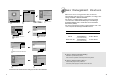

Click 'Finish'.
Click 'Next>'.
98
9
No image is displayed with LED blinking.
Monitor is in power saving mode.
Use mouse or keyboard to release power saving mode.
No image is displayed without LED on.
Power cable plug must be pulled out.
Check the power plugs on monitor and on the wall.
Power Management Feature
When not in use for a long period of time, the monitor
automatically reduces its power consumption, meeting power
saving standards of EPA and NUTEK.
The monitor is equipped with a power saving circuit that
conforms to the world-standard Display Power Manager
Signalling (DPMS) mode of Video Electronics Standard
Association (VESA).
The power management feature requires that the video card
of the computer should support DPMS function.
Status Color of LED Power Consumption
Normal Green Normal Power
Pause Amber/Blinking
( 1 second interval )
Power Cut Off Amber/Blinking
( 2 second interval )
Click 'Advanced..'.
Click 'Next>'.
Click 'Monitor'.
Click 'Display a list of all...'.
Click 'Next>'.
Click 'Have Disk..'.
Select the driver and click 'OK'.
Click 'Next>'.
3. Select Exit if the monitor model is changed, and then reboot Windows.
10 W or Below
5 W or Below