
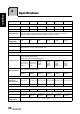
Specifications



33
English
7
Dissembling the stand base
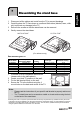
1 Disconnect all the cables and cords from the TV to prevent breakage.
2 Carefully place the TV face down on a soft and flat surface (blanket, foam, cloth,
etc) to prevent any damage to the TV.
3 Remove the screws so that the stand base can be removed.
4 Gently remove the stand base.
Wall mounting the TV:
1 Purchase a VESA compatible wall bracket
(please refer to the table above).
2 Locate your ideal TV position on the wall.
3 Fix the wall bracket firmly on the wall.
4 Secure the TV to the bracket using the 4
mount holes on the back and center of the TV.
*Installing the LCD TV requires special skill that should only be performed by qualified service personnel.
Customers should not attempt to do the work themselves. Hannspree bears no responsibility for improper
mounting or mounting that results in accident or injury. You can ask a qualified service personnel about
using an optional bracket to mount the TV to the wall.
Model Name
VESA-compatible
wall bracket (WxH)
Mount holes
number
Screw type Maximum loading
SJ19DMAB 100x100 mm 4 Metric 4 x 10 mm 15 kg
SJ22DMAB 100x100 mm 4 Metric 4 x 10 mm 18 kg
SJ25DMAB 200x100 mm 4 Metric 4 x 10 mm 24 kg
SJ28DMBB 200x100 mm 4 Metric 6 x 10 mm 30 kg
SJ32DMBB 200x200 mm 4 Metric 6 x 10 mm 36 kg
SJ42DMBB 400x200 mm 4 Metric 6 x 10 mm 72 kg
Note:
• Please read the instructions of your specific wall bracket to properly wall mount
the TV.
• The TV stand base can be screwed on a table or a hard surface using the hole
on the back of the stand base.
(For reference only)
27.5”/31.5”/42”
18.5”/21.6”/24.6”