
Specifications

26
English
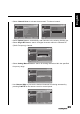
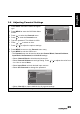
• Select the Channel Sort to change the order of the channel list.
•The Channel Edit allows you to adjust the detailed items, including Channel
Number, Channel Name, Frequency, Colour System, and Sound System for
each channel.
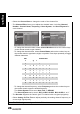
- To change the channel number, select Channel Number and use the number keys
on the remote control to type numbers.
- To change the channel name, select Channel Name and use the number keys on
the remote control to type letters, digits, or symbols. Press keys repeatedly to toggle
different characters.
- To change the channel frequency, select Frequency and use the number keys on
the remote control to type the desired frequency.
- The Colour System can be set to Auto, DAL, or SECAM.
- The Sound System can be set to I, D/K, A2 D/K, A2 D/K1, B/G, A2 B/G, L, or L’.
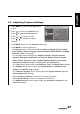
•The Decoder supports the Canal+ (paid TV channel with encrypted programs).
• Select Analog Ch Fine Tune to adjust precisely the analog channel frequency to
ensure high signal quality.
Note: The TV Settings are only available in TV mode.
Picture
Sound
TV
Features
Parental
55
56
57
58
59
60
61
----
----
----
----
----
----
----
Analog
Analog
Analog
Analog
Analog
Analog
Analog
OK Menu
Enter Select Back
Picture
Sound
TV
Features
Parental
Transmitter
Channel Number:
Channel Name:
Frequency:
Colour System
Sound System
Auto
B/G
OK Menu
Enter Select Back
55
-----
619.285
KEY CHARACTER
0
-
@0
1 _ - 1
2 ABCab c 2
3 D E F d e f 3
4 GH I g h i 4
5 J K L j k l 5
6 MNOmn o 6
7 P Q R S p q r s 7
8 TUV t u v 8
9 W X Y Z w x y z 9