
Specifications

24
English
3.4 Adjusting TV Settings
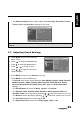
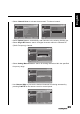
• The SPDIF Delay can be adjusted by pressing / to move the scales from
0 to 250.
• The
AVL
can be set to
On
or
Off
.
• The
Type
can be set to
Normal
,
Hard of Hearing
, or
Audio Description
.
• To adjust the
Audio Description
, select
Audio Description
in the
Type
setting
first. Press / to adjust the scales from 0 to 100.
Note: The options available on the OSD may vary depending on the input signal
source.
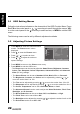
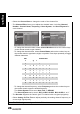
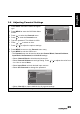
1 Press INPUT and select TV as the signal
type.
2 Press MENU to enter the OSD Main Menu
screen.
3 Press to select the TV menu.
4 Press to enter the TV menu.
5 Press
/
to select an item.
6 Press
/
to adjust the scales or
options settings.
7 Press MENU to return to the TV menu entry.
8 Press MENU to exit the OSD menu.
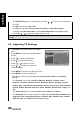
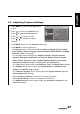
- The TV menu can be used to adjust the Country, Audio Carrier, and Channels
settings.
•The Country can be set to Austria, Belgium, Bulgaria, Croatia, Czech
Republic, Denmark, Finland, France, Germany, Greece, Hungary, Iceland,
Ireland, Italy, Luxembourg, Netherlands, Norway, Poland, Portugal, Romania,
Russia, Serbia, Slovakia, Slovenia, Spain, Sweden, Switzerland, Turkey, and
UK.
•The Audio Carrier can be set to Dual I, Dual II, Mono, and Stereo.
•The Channels can be used to perform or adjust the Channel Scan, Update Scan,
Single RF Scan, Analog Manual Scan, Channel Skip, Channel Sort, Channel
Edit
, Decoder, and Analog Ch Fine Tune settings.
Picture
Sound
TV
Features
Parental
Country
Audio Carrier
Channels
UK
Stereo
OK Menu
Enter Select Exit