
Specifications

23
English
3.3 Adjusting Sound Settings
• The
Advanced Video
can be used to adjust the
Auto Config
,
Horizontal
,
Vertical
,
Phase
,
Clock
, and
Resolution
settings for PC mode.
Note: The options available on the OSD may vary depending on the input signal
source.
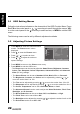
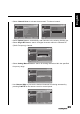
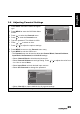
1 Press MENU to enter the OSD Main
Menu screen.
2 Press to select the Sound menu.
3 Press to enter the Sound menu.
4 Press
/
to select an item.
5 Press
/
to adjust the scales or
options settings.
6 Press MENU to return to the Sound menu entry.
7 Press MENU to exit the OSD menu.
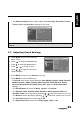
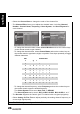
- The Sound menu can be used to adjust the Sound Mode, Equalizer 120Hz, Equalizer
500Hz, Equalizer 1.5KHz, Equalizer 5KHz, Equalizer 10KHz, Balance, Virtual
Surround, Digital Audio Out, SPDIF Delay, AVL, Type, and Audio Description
settings.
•The Sound Mode can be set to Music, Speech, or Personal.
• The
Equalizer 120Hz
,
Equalizer 500Hz
,
Equalizer 1.5KHz
,
Equalizer 5KHz
, and
Equalizer 10KHz
can be adjusted by pressing / to move the scales from -6 to 6.
• The
Balance
can be adjusted by pressing / to move the scales from -50 to 50.
• The
Virtual Surround
can be set to
On
or
Off
.
• The
Digital Audio Out
can be set to
Dolby Digital
,
PCM
, or
Off
.
Picture
Sound
Features
Parental
Brightness
Contrast
Colour Temperature
Advanced Video
100
50
Cool
OK Menu
Enter Select Exit
Picture
Sound
TV
Features
Parental
Sound Mode
Equalizer 120Hz
Equalizer 500Hz
Equalizer 1.5KHz
Equalizer 5KHz
Equalizer 10KHz
Balance
Virtual Surround
Digital Audio Out
Personal
0
0
0
0
0
0
Off
PCM
OK Menu
Enter Select Exit