
Specifications



18
English
2
Setting up your TV
2.1 Power Connection
1
Connect the power cord to the AC IN input jack on the rear of the TV.
2 Insert the plug at the other end of the power cord into a
power outlet
.
2.2 Rear Connections
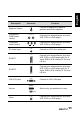
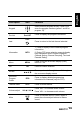
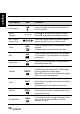
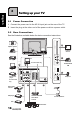
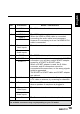
See the illustration and table below for device connection instructions.
SCART
SCART
1
SERVICE
Y
LR
P
R
P
B
PC I
N
VGA
SPDIF
CABLE A
NTENNA
TV
/
DT
V
AUDIO
SCART 2
HDMI IN
C
OMPONENT
HDMI 1
HDMI 2
AUDIO
IN
S
ERVICE
HDMI 3
R L
VIDEO
CI SLOT
AUDIO
SERVICE
3 4 65
7
8
9
2
1
Blu-ray Disc
player
DVD player
Camcorder
Home theater
DVD player
Video Game
Console
VCR
PC
27.5”/31.5”/42”
only
27.5”/31.5”/42” only
PC
VCR/VCD/DVD/STB
Video Game
Console
CI-based
devices
Camcorder
VCR/VCD/DV
D
STB
Speaker system
TV cable / antenna
Earphone