
Specifications



13
English
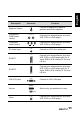
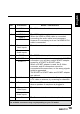
Keypad
Use to select a program directly. Press 0-9 to
enter the program numbers (press 1 and 0 for
program 10).
Pro.List Pro.LIST
Press to display the programs contained.
Last Press to return to the last channel selected.
Information INFO
1. Press to display current channel/program
information.
2. During DTV menu selection, press to display
help information about Channel Organizer,
Channel Sorting, Channel Grouping, Time and
Parental Rating.
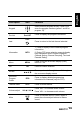
Menu MENU
Press to turn the on-screen display (OSD)
menu on / off.
OK OK Press to confirm selection.
Arrows
Press up, down, left or right to scroll through
the on-screen display menus.
Electronic
Program
Guide
EPG
Press to display detailed programming
information for channels (only for DTV).
Teletext mode TEXT
Press to active teletext.
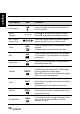
Volume adjust
Press VOL
+ to increase audio volume.
Press VOL
- to decrease audio volume.
Mute
Press to eliminate sound. Press it again or
press the volume adjust buttons to restore
sound.
Description Icon Function
LAST
V
OL / VOL
MUTE