
Datasheet



40
English
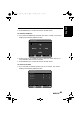
For Channel Skip
3 Go to Channel Skip by pressing CH UP or CH DOWN and confirm by
pressing VOL UP. The screen displays the following adjustment box:
4 Press CH UP or DOWN to select a channel to be skipped.
5 Press VOL UP or VOL DOWN to turn on/off the function.
6 Press MENU key to confirm and return to Main menu.
For Channel Fine Tune
3 Go to Channel Fine Tune and press VOL UP to confirm. The screen
displays the following adjustment box:
4 Press CH UP or DOWN to select a channel to be fine tuned.
5 Press VOL UP or VOL DOWN to adjust frequency.
Channel Skip
On Off
Down
Up
1
▲
▲
▲
▲
VOL
MENU
Adjust: Return:
+-
Select:
CH
Channel Fine Tune
Channel
Freq.Down 48.25 MHz Freq.Up
1
VOL
MENU
Adjust: Return:
+-
Select:
CH
generic_T6_T6.book Page 40 Monday, November 28, 2005 11:22 AM