
Datasheet






32
English
OSD Function Menu
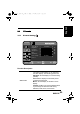
Before going to details of each OSD item, you may get acquainted with the
placement of the OSD system:
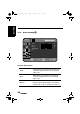
The following menus can be set by different adjustment methods.
Adjustment methods are described after function description of each
setting's menu.
PICTURE
Brightness
Neutral
19
33
25
30
00
Contrast
Sharpness
Hue
Saturation
Color Temp.
Preset
T V
Video Mode
Standard
VOL
CH MENU
Enter: Exit:Select:
+
CURRENT MENU:
Display the title of the
menu you currently
choose.
MAIN MENU:
Display a list of
menu items. The
chosen item is
marked by
different color from
other menu items.
ADJUSTABLE ITEMS:
Display the setting/value of the
adjustable items.
INSTRUCTIONS
Quick instructions for adjusting the settings.
CURRENT MODE:
TV or PC
generic_T6_T6.book Page 32 Monday, November 28, 2005 11:22 AM