
Datasheet






3
31
English
Menu Setting
This Chapter guides you through adjusting the On-Screen Display (OSD)
menu system under TV and PC mode. You may adjust the setting from your
remote control or the buttons located on the TV's front control panel.
TV & Remote Control button
Control Panel Remote Control
-Menu
-M
Menu/Enter
CH UP
(U/>/S/+/
^)
CH DOWN
(V/</T/-/v)
CH UP / Arrow
(S/+/S/^)
CH DOWN
(T/-/T/v)
VOL UP
(+/>/U/
^)
VOL DOWN
(-/</V/v)
VOL UP / Arrow
(+/S/X/>)
VOL DOWN / Arrow
(-/T/W/<)
Note:
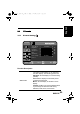
Follow the instructions indicated on the bottom of the OSD
Function menu. In the following example, press VOL UP or X
arrow key to enter your setting, CH UP or DOWN or S/T arrow
key to navigate through item, or MENU to exit the OSD menu.
OK
Preset
VOL
CH
MENU
Enter: Exit:Select:
+
Menu Setting
generic_T6_T6.book Page 31 Monday, November 28, 2005 11:22 AM