
Datasheet


25
English
SCART
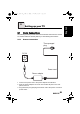
Use the scart provided to connect a TV to a VCR, VCD or DVD player. You
can switch between S-video and its composite by using the AV switch on the
right side of the scart. Move the bar to the left end to switch the TV to CVBS
mode and move it to the right end to switch it to YC (S-Video) mode.
YC
CVSB
Front view
Connect to
S-Video connector
Connect to AV
connectors
Back view
Connect to
scart output
generic_T6_T6.book Page 25 Monday, November 28, 2005 11:22 AM