
Datasheet


21
2
English
Setting u p your TV
2.1 Basic Connections
The following sections provide users with some basic instructions to use the
TV. Please read them carefully before you start utilizing the functions.
2.1.1 Power Connection
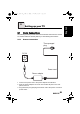
1 Connect the power cord to the power adapter as illustrated.
2 Plug the power adapter connector into the DC-IN jack on the rear
panel of the TV.
3 Plug the three-pronged plug at the other end of the power cord into a
power outlet.
Power cord
DC-IN
Power adapter
Three-pronged
plug
Setting up your TV
generic_T6_T6.book Page 21 Monday, November 28, 2005 11:22 AM