
User guide





19
4.2.3 MP4 playback mode
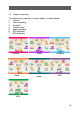
A movie play list will be displayed when this mode is activated.
Fig. 4-9 Fig. 4-10 Fig. 4-11
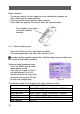
Use the joystick and shutter button to control the movie playback.
The following table shows the key functions:
MP4 playback Play list
FR (fast reverse) the movie;
return to the play list when
the movie is stop
FF (fast forward)
Increase audio volume Select previous file
Reduce audio volume Select next file
MENU Enter and exit the delete
menu
OK Play the selected movie
Shutter Start/Stopping playing a
movie
【Download MP4 files】
If an empty list is displayed after the video camera is switched over to MP4
mode, MP4 file should be downloaded first.
The process is as follows:
Connect the video camera to a PC in Mass Storage mode.
Open the removable storage device and create a folder named “MPEG”
under the root directory. If this folder already exists, this step can be
skipped.
Convert the movie stored in the computer to AVI format and then copy it to
“MPEG” folder.