
User guide





18
appears.
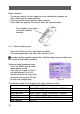
Select “Continuous Shots” option and press OK key for confirmation
Fig. 4-5 Fig. 4-6
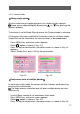
【Self-Timer】
In self-timer mode, picture will be taken at 10 seconds after pressing the
Shutter button.
Use the Menu function to set self-timer mode, similar single shot and
continuous shots.
Fig. 4-7 Fig.4-8
The following table lists the options for each camera menu item.
Capture Options Single shot, Continuous shots, Self-Timer
White balance Auto, Sunny, Cloudy, Fluorescent, Tungsten
EV compensation -2 ~ +2EV, at 1/2EV step
Resolution
4640×3480,4000×3000,3264x2448,2560x1920,
2048×1536,1600×1200,800×600
Image quality Fine, Normal, Basic
Photo effect Normal, Sepia, B/W, Soft and Vivid
Flash mode Auto, off, On