
Getting Started Guide




9
To dial a number, touch ‘Voice Call’ button to select SIM1 card or SIM2 card to
make a call. To end a call, touch ‘END’ button (Red icon).
1. Call log tab: Select an entry listed in the log to call the number.
2. Contacts tab: Contacts with phone numbers are listed. Select a contact, and
then select the phone number to dial the call.
2.3 Answering and Ending a call
When you receive a phone call, the incoming voice call screen will appear,
allowing you to either answer or ignore the call.
1. To answer an incoming call, slide up to answer.
2. To reject a call, slide down to refuse.
2.4 In-call options
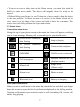
While on a call, reveal the in-call options: Speaker, Mute, Hold, End.
Note that if Bluetooth services are on and you are connected to a hands-free
device, the more menu indicator will show Bluetooth on.
1. Speaker: To use the speaker, select ‘Speaker’ so it shows a blue bar. To turn it
off, select it again so the bar is unfilled. The status bar will display this icon
when the speaker is on.
2. Mute: To mute your side of the conversation, select ‘Mute’ so it shows a blue
bar. To turn it off, select it again so the bar is unfilled. The status bar will display
this icon when Mute is on.
3. Hold: To put an active call on hold, select ‘Hold’ so it become regain. To
resume the call, or take the call off hold, select it again so the bar is unfilled. If
you take a call while already on a call, the first call will be placed on hold
automatically. The status bar will display this icon when a call is on hold.
4. Add call: If you need to enter numbers while on a call, touch ‘Add call’.
2.5 Using call history
1. The missed call icon
appears in the title bar when you missed a call.
2. Use ‘Call log’ tab to check who the caller was, or view all your dialed
numbers, and received calls. To open ‘Call log’ tab, touch ‘Call log’ button in
the phone screen to enter the call history list.
3. Scroll to select the contact or number you want to dial, touch ‘Call’ button.