
User Manual






Page 81 | 150
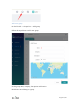
Follow the steps above, to enable cloud management feature, choose the Data Server
which is nearest your devices located. There are three Data Server, 'Global', 'America'
and 'Europe'. If your devices are neither in America nor in Europe, just select 'Global'.
Global Data Server is at Japan.
Create GoodCloud account
Visit https://www.goodcloud.xyz to access GoodCloud web site by Chrome or your
favorite browser.
Sign up an account, and sign in. If you don't find the verify email, look in spam or check
email later.
If you have any difficulty with sign up, please send email to admin@goodcloud.xyz for
help.
Select region
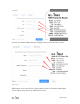
At the first time when you sign in, it will pop up a dialog to let you select the region,
select the region that your device selected Data Server on the Web Admin Panel (Step
1.2).
You can change the region on the top right corner at anytime.