
User Manual






Page 80 | 150
Local upgrade
Open a web browser (we recommend Chrome) and to access router Web Admin Panel
(default url is http://192.168.8.1).
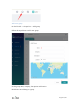
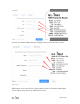
At the left side, UPGRADE -> Local Upgrade, select the firmware file you download,
you can turn off "Keep Settings" for more stable, click "Install" button. It takes several
minutes to install.
If you want to learn more about upgrade, please scroll top -> Setup -> Choose the model
-> Upgrade
Enable Cloud Manage on router Web Admin Panel
Open a web browser (we recommend Chrome) and to access router Web Admin Panel
(default url is http://192.168.8.1).