
User Manual




Page 140 | 150
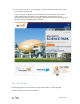
3. Use your web browser to visit a webpage, it will be redirected to the captive portal
of the hotspot automatically.
If you are using smartphone but your web browser doesn't redirect to the captive
portal. Please turn off the Wi-Fi of your smartphone and then turn it on and
reconnect to the Wi-Fi of your router again. The captive portal should be popped up
directly after you entered the Wi-Fi password.
10.6. GL.iNet app
GL.iNet app requires router firmware version 3.100 and above. Please upgrade.
Click the Setup menu, choose your model.