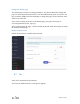
After disable Cloud, the interface is like above.
Turn on Captive Portal
Open a web browser (we recommend Chrome) and to access router Web Admin
Panel(default url is http://192.168.8.1).
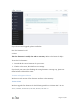
At the left sidebar, APPLICATIONS -> Portal, follow the steps below to enable Captive
Portal.