
User Manual





Page 144 | 147
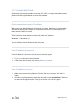
Connect via Luci
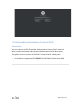
If you can not find Advanced menu item, please follow the steps to install it.
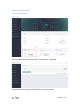
After it install successfully, you will find the Advanced menu item.
Click Advanced to direct to Luci which is the default web interface of
OpenWrt. You can check the detailed system log or conduct more
advanced configurations there.
Note: The username is root. The password is same as the one that you use
to access the web Admin Panel.
2. Connect to EAP wifi
Go to Network->Wifi(or Wireless).