
Specifications

English
7
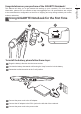
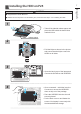
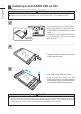
Installing the HDD on P25
CAUTION
Supplied Items: Buffer Bracket*1
Please remove the power cord and battery rst, and Follow the Step 1~4 for installing the HDD.
1
2
3
4
1
2
• Take off the labeled release paper and
place the HDD within the dotted lines
marked in blue.
12
3
• Fold the Mylar as shown in the picture
and ensure that the Mylar covers the
HDD from all sides.
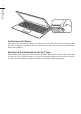
• Open the back cover of the laptop and
connect the SATA Bus with HDD/SSD.
1
2
• Once connected – stick label over the
Connector to ensure the HDD/SSD
does not slip out of the package.
• Place the HDD/SSD into the slot until
securely placed.
• Put the back cover on and fasten the
screws. Your laptop is now ready with
the latest additional storage.
release paper