
Datasheet






Software Installation- 21 -
English
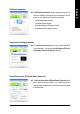
nView allows you to connect separate displays to single
graphics card.
• nView modes: select your preferred nView display modes
here. Options: Single display/ Clone/ Horizontal Span/
Vertical Span/ Dualview
• Display pair: select a single display or display pair. The
selected display combination will appear in the graphical
representation below.
If TV is chosen as the display, you will need to select the
proper TV format. To do this, click "Device Setting" followed
by "Select TV format". Select the format for your television
and then click "Apply" followed by "OK".
nView Display Settings properties
*
"*" This feature will not be available when SLI multi-GPU is enabled.
Performance and Quality Settings properties
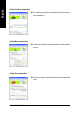
The sliders lets to decide whether your application should use
quality or high performance texture.
• Application profiles: Select the application profile from the list
of profiles.
• Global driver settings: Select the Settings item and move
the slider below to set the degree of antialiasing to used in
Direct3D and OpenGL applications.
• Antialiasing settings value: allows to set the degree of the
Global Driver Settings.
SLI multi-GPU
*
To enable SLI mode, select the Enable SLI multi-GPU
check box and click Apply after installation of two GV-
NX66T128D/VP/VP-E graphics cards on an SLI-capable
motherboard. Then restart your system when prompted.
"*" Only Windows XP operating system supports the SLI mode.
Please do not enable SLI multi-GPU in Windows 2000.
Display Model GV-NX66T128D GV-NX66T128VP/VP-E
Matrix CRT+TV Yes Yes
CRT+DVI Yes Yes
DVI+TV Yes Yes