
Operation Manual


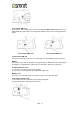

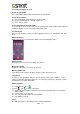


To install the SIM card
There are two slots for SIM cards. Left slot is for SIM1 (WCDMA+GSM) and right slot is for
SIM2 (GSM).The gold contacts are facing down. And the cut-off corner is facing toward the
inside.
To install the SIM1 card To install the SIM2 card
To remove the SIM card
Please turn off your phone first, and use your finger to slide the SIM card out of card slot.
Battery
Your phone comes with an embedded rechargeable battery. Battery life varies depending on
the network, used applications, and the type of connections attached to your phone.
To replace the back cover
(1) Insert the cover into the slot from the bottom.
(2) Then, press all around back cover fully until hearing clicks.
Memory card
You may need a microSD card to store photos, music, videos and other data.
To install the memory card
(1) Insert the memory card with the gold contact facing down.
(2) Push the memory card until it clicks into slot.
GX2 |6