
Operation Manual
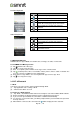



Icons
Programs
Description
Icons
Programs
Description
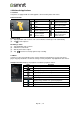
Video Player
Playing videos.
Drive
Google drive to
store files
with Google Docs.
LockScreen
To lock phone in a
touch.
Photos
Google service to edit
and back up pictures.
Play
magazine
Google service to get
more of the news and
magazines.
Play Music
Listening to your music
collection anywhere.
SIM Toolkit
It enables the SIM to
initiate actions.
Voice
Search
Quickly to search your
phone, the web, and
nearby locations by
speaking.
Wireless
Input Device
To turn your
android device to
a wireless input device.
6. Managing Your Phone
6.1 Protecting Your Phone
You can protect your phone from unauthorized users in a few different ways.
Set up PIN Protection
(1) Tap Applications tab > Settings > Security > Screen lock > PIN.
(2) Enter your PIN, and then, tap “Continue”. Confirm your password, then, tap “OK”.
(3) If you want to disable screen lock security, please tap Application Drawer > Settings > APPS
tab > Security > Screen lock. Confirm your PIN, and then, tap “Continue”. Tap “None” to
disable it.
Set up Password Protection
(1) Tap Applications tab > Settings > Security > Screen lock > Password.
(2) Enter your password, and then, tap “Continue”. Confirm your password, then, tap “OK”.
(3) If you want to disable screen lock security, please tap Application Drawer > Settings >APPS tab
> Security > Screen lock. Confirm your password, and then, tap “Continue”. Tap “None” to
disable it.
Set up Unlock Pattern
You can further secure your data by locking the screen and requiring a screen unlock pattern every
time after your phone is turned on or it wakes up from the sleep mode every time (screen is off ).
(1) Tap Applications tab > Settings > Security > Screen lock > Pattern.
(2) Draw the unlock pattern by connecting at least four dots. Then tap “Continue”.
(3) Draw the unlock pattern again, and then, tap “Confirm”.
(4) If you want to disable the function, please tap Applications tab > Settings > Security > Screen
lock. Confirm the saved pattern, and then, tap “None” to disable it.
Set up Face Unlock
You can use front-facing shot to verify your identity to unlock your phone.
(1) Tap Applications tab > Settings > Security > Screen lock > Face Unlock.
(2) Tap Set it up > Continue.
(3) Show your face in front of your phone until face captured. Then tap continue.
(4) Set up Pattern or PIN as the backup lock.
(5) If you want to disable the function, please tap Applications tab > Settings > Security > Screen
lock. Confirm the saved pattern, and then, tap “None” to disable it.
Set up Voice Unlock
You can use voice command to unlock your phone.
(1) Tap Applications tab > Settings > Security > Screen lock > Voice Unlock.
Rey R3 |14