
Operation Manual
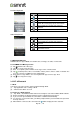

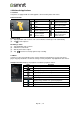


5. Pre-Installed Programs Introduction
Icons
Programs
Description
Icons
Programs
Description
Best Choice
Recommended the best
software and
functionality.
Browser
Browses the web and
download files from
Internet.
Calculator
Performs arithmetic
functions, such as
addition, subtraction,
multiplication, and
division, etc.
Calendar
Creates and tracks
schedule or appointments.
Camera
Captures still images.
Chrome
Google’s browser service.
Clock
Sets up alarm clock.
Contacts
Stores names, numbers,
e-mail, and other
information.
Downloads
To view files and items
you've downloaded.
Dropbox
Bring and share your
photos, docs, and videos
anywhere.
YouTube
It is online video
streaming service that to
view, search, and upload
videos.
Email
Sends and receives
e-mail messages.
File
Manager
Manages all files.
FM Radio
Listen to music/news on
the FM Radio.
Gallery
Views and edits photos
and videos.
Gmail
Google’s web-based
e-mail service.
Google
Search
Google’s search service.
Google
Settings
Shortcuts to your
Google+ settings, Maps
&
Latitude, Location,
Search, and Ads.
Google+
Checks friends’ updates
and post updates of your
own.
Hangouts
Google’s instant
messaging program.
Kingsoft
Office
Office Software.
Local
Search for places that
you want near your
location.
Maps
Google’s mapping
service for searching
places you want.
Messaging
Sends and receives all
types of messages.
Music
Plays and manages the
music and audio files.
Navigation
Help you get the
destination.
News &
Weather
Google’s news and
weather services.
Phone
Makes and receives
phone calls.
Play Books
Google e-book Store.
Play
Games
Google game center.
Play Store
To find applications
which you can download
and install on your
phone.
Sound
Recorder
Records a voice note.
System
update
Checking the system
update information.
TouchPal
Keyboard
To set up your Touchpal
Keyboard.
Rey R3 |13