
Specifications


6VX7B-4X Motherboard
75
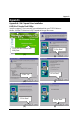
Appendix C: Creative Sound Driver Installation (Optional)
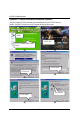
Insert the support CD that came with your motherboard into your CD-ROM driver or
double –click the CD driver icon in My Computer to bring up the
screen
.
(1)
(2)
(3)
(4)
(5)
(6)
Audio
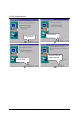
2.Click “OK”.
3.Click “Yes”.
1.Click “Creative 5880 Sound
Driver”.
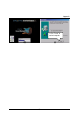
4.Click “Next”.
5.Click “Next”.
6.Click here.