
Specifications


BIOS Setup
66
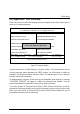
Hardware Monitor
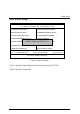
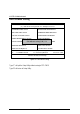
Figure 10: Hardware Monitor
•
••
•
ACPI Shutdown Temp. (
°
°°
°
C /
°
°°
°
F)
(This function will be effective only for the operating systems that support ACPI
Function.)
Disabled Disable ACPI Shutdown function.
(Default Value)
60°C / 140°F Monitor CPU Temp. at 60°C / 140°F, if Temp. > 60°C / 140°F
system will automatically power off.
65°C / 149°F Monitor CPU Temp. at 65°C / 149°F, if Temp. > 65°C / 149°F
system will automatically power off.
70°C / 158°F Monitor CPU Temp. at 70°C / 158°F, if Temp. > 70°C / 158°F
system will automatically power off.
75°C / 167°F Monitor CPU Temp. at 75°C / 167°F, if Temp. > 75°C / 167°F
system will automatically power off.
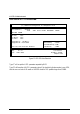
AMIBIOS SETUP –HARDWARE MONITOR
( C ) 1999 American Megatrends, Inc. All Rights Reserved
ACPI Shut Down Temp. :Disabled
Current CPU Temp. :36
°
C/96
°
F
Current System Temp. :28
°
C/82
°
F
Case Status :Closed
Current CPU Fan Speed :5487 RPM
Current System Fan Speed :0 RPM
Vcore :1.634V
+3.300V :3.590V
+5.000V :5.119V
+12.000V :11.926V
ESC : Quit
↑↓←→
: Select Item
F1 : Help PU/PD/+/- : Modify
F5 : Old Values (Shift)F2 :Color
F6 : Load BIOS Defaults
F7 : Load Setup Defaults