
Specifications




6VX7B-4X Motherboard
55
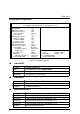
Power Management Setup
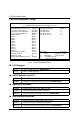
Figure 5: Power Management Setup
•
••
•
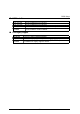
ACPI Sleep type
S1/POS Set ACPI Sleep type is S1
(Default Value)
S3/STR Set ACPI Sleep type is S3.
•
••
•
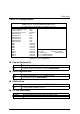
USB KB Wakeup From S3~S5
Enabled Enable USB Keyboard Wakeup from system.
Disabled Disable USB Keyboard Wakeup from system.
(Default Value)
•
••
•
Video Power Down Mode
Disabled Disabled Video Power Down Mode Function.
Suspend Set Video Power Down Mode to Suspend.
Stand By Set Video Power Down Mode to Stand By.
(Default Value)
•
••
•
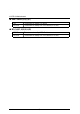
Hard Disk Power Down Mode
Disabled Disabled Hard Disk Power Down Mode Function.
Suspend Set Hard Disk Power Down Mode to Suspend
Stand By Set Hard Disk Power Down Mode to Stand By.
(Default Value)
AMIBIOS SETUP –POWER MANAGEMENT SETUP
( C ) 1999 American Megatrends, Inc. All Rights Reserved
ACPI Sleep Type :S1/POS PME Event Wake up :Enabled
USB KB Wakeup From S3~S5 :Disabled RTC Alarm Power On :Disabled
Video Power Down Mode :Stand By RTC Alarm Date :15
Hard Disk Power Down Mode :Stand By RTC Alarm Hour :12
Suspend Time Out(Minute) :Disabled RTC Alarm Minute :30
Display Activity :Ignore RTC Alarm Second :30
IRQ3 :Monitor
IRQ 4 :Monitor
IRQ 5 :Ignore
IRQ 7 :Monitor
IRQ 9 :Ignore
IRQ 10 :Ignore
IRQ 11 :Ignore
IRQ 13 :Ignore
IRQ 14 :Monitor
IRQ 15 :Ignore
Soft-off by Power Button :
Instant off
ESC : Quit
↑↓←→
: Select Item
AC Back Function :Memory
F1 : Help PU/PD/+/- : Modify
Modem Use IRQ :4 F5 : Old Values (Shift)F2 :Color
Modem Ring On/Wake On Lan :Enabled F6 : Load BIOS Defaults
F7 : Load Setup Defaults