
Specifications




6VX7B-4X Motherboard
31
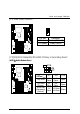
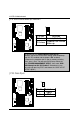
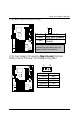
JP9: USB Device Wake up Selection
Pin No. Definition
1-2 close Normal (Default)
2-3 close
Enabled USB Device
Wake up
1
(If you want to use “
USB KB Wakeup from S3~S5
”
function, you have to set the BIOS setting “USB KB Wakeup
from S3~S5” enabled, and the jumper “
JP9
” enabled).
*(Power on the computer and as soon as memory counting
starts, press <Del>. You will enter BIOS Setup. Select the
item “
POWER MANAGEMENT SETUP
”, then select “
USB
KB Wakeup from S3~S5: Enabled
”. Remember to save
the setting by pressing "ESC" and choose the “SAVE & EXIT
SETUP” option.)
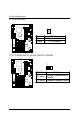
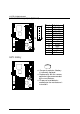
JP23: Case Open
Pin No. Definition
1 Signal
2 GND
1