
Quick Start Guide





74
Connecting Two GV-600A Cards
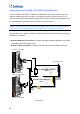
You can install two GV-600A Cards for up to 32 channels. Master Card is the card with 1-16
channels and Slave Card is that with 17-32 channels. Normally, the card attached to the
lower PCI slot number will act as Master, and the card attached to the higher PCI slot
number will act as Slave.
Two GV-600A Cards only support two audio channels: Connect microphones to Audio
1 connector of the Master Card, and Audio 5 connector of the Slave Card.
Hardware Watchdog Connection: Connect the supplied Hardware Watchdog Jump Wire
to the Master Card only (Figure 1-51).
Accessory Card Connections:
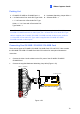
GV-NET/IO Card: Connect the card to the Master Card only.
GV-Loop Through Card: Connect the card for each video capture card.
GV-Multi Quad Card: Only connect one card to any of two video capture cards.
Video 1~8
(Black)
Audio 1~4
(White)
Video 9~16
(Blue)
GV-600A Card
(Master Card)
Hardware
Watchdog
Video 17~24
(Black)
Audio 5~8
(White)
Video 25~32
(Blue)
GV-600A Card
(Slave Card)
GV-NET/IO Card
GV-Loop Through Card /
GV-Multi Quad Card
Figure 1-50