
Quick Start Guide






Video Capture Cards
37
1
Connecting Hardware Watchdog
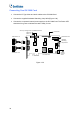
To restart the computer automatically by the hardware watchdog on the GV-Video Capture
Card, a connection needs to be made from the card to the motherboard.
1. Using the supplied jumper wire, connect the reset jumper pins on the card and on the
motherboard.
PWSW
LEDHDD
RST
Motherboard
Front Panel Jumper
PC Reset Switch
GV 3008 - 8
3008
GV-3008 Card
Hardware
Watchdog
Figure 1-28
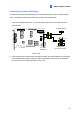
2. If the computer has a reset switch, the switch’s jumper wire should already be connected
to the motherboard’s reset jumper pins. Remove the switch wire from the motherboard
and connect it to the reset jumper pins on the card.