
Quick Start Guide






Video Capture Cards
35
1
Connecting Two GV-3008 Cards
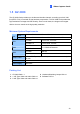
You can install two GV-3008 Cards for a total of 16 channels. Master Card is the card with 1-
8 channels and Slave Card is that with 9-16 channels. The Master and Slave cards can be
distinguished by the labels on cards, as shown below:
Master Card:
Slave Card:
IMPORTANT:
1. The Slave Cards cannot work alone. They need to work in conjunction with the Master
Cards.
2. If both GV-3008 Cards are Master Cards, it is required to identify which are Master
and Slave by the PCI-E slot number. Normally, the card attached to the lower PCI-E
slot number will act as Master, and the card attached to the higher PCI-E slot number
will act as Slave.
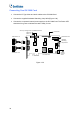
Hardware Watchdog Connection: Connect the supplied Hardware Watchdog Jump
Wire to the Master Card only (Figure 1-28).
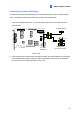
Accessory Card Connections:
GV-NET/IO Card: Connect the card only to the Master Card.
GV-Loop Through Card: Connect the card to two 10-pin connectors on each
Master and Slave Card by using a supplied cable with four 10-pin headers.
GV-Multi Quad Card: Connect the card to two 10-pin connectors on each Master
and Slave Card by using a supplied cable with four 10-pin headers.