
Quick Start Guide






34
Connecting One GV-3008 Card
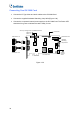
Connect the D-Type video and audio cables to the GV-3008 Card.
Connect the supplied Hardware Watchdog Jump Wire (Figure 1-28).
Connect the computer’s internal power supply to the GV-3008 Card. The Power LED
should be lit in green to indicate the card is ready for use.
GV 3008 - 8
3008
Power LED
Hardware
Watchdog
Jumper Wire
Internal
Power Y
Cable
GV-3008 Card
Video/Audio 1~4
Video/Audio 5~8
GV-NET/IO Card
Video 5~8
Video 1~4
GV-Loop Through Card / GV-Multi Quad Card
Figure 1-26