
Quick Start Guide




10
Connecting One GV-5016 Card
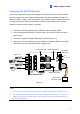
Connect the video and audio cables to the GV-5016 Card.
Connect the supplied Hardware Watchdog Jump Wire (Figure 1-11).
After you turn on the computer, the Power LED (D19) and Status LED (D17) should be
lit in green to indicate the card is ready for use.
Figure 1-7
When connecting the cable, make sure the cable is connected correctly:
The letter “H” on the connector should be on the same side as the chipsets.
GV-5016 Card
H
Figure 1-8
The LFH connector on the cable is in the shape of a trapezoid and should match the
trapezoid connector on the capture card.
GV-5016 Card
Cable
Figure 1-9
Note:
1. The GV-5016 Card only works when the supplied USB Dongle is inserted to PC.
2. The GV-5016 Card cannot work with microphones which acquire power from the PC.
Use microphones which have external power supply.