
Quick Start Guide




4
Connecting Hardware Watchdog
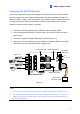
Insert the Hardware Watchdog Jumper Wire to the 2-pin connectors on the Card. The (+) pin
on the Card must connect to the Reset (+) pin on the motherboard, and the (-) pin on the
Card to the Ground (-) pin on the motherboard. Ensure the connection is correct; otherwise
the hardware watchdog will not work.
When installing multiple capture cards, the Hardware Watchdog can be connected to any of
the GV-SDI-204 cards, no matter if the cards are all GV-SDI-204 cards or a combination of
GV-SDI-204 cards and other capture cards. If you are installing GV-SDI cards in addition to
existing video capture cards and the Hardware Watchdog has already been connected, you
do not need to change the connection to a GV-SDI-204 card.
Figure 1-2
Note: To locate the motherboard’s Reset (+) pin and (-) pin, please refer to the
motherboard’s user manual.