
Quick Start Guide




Video Capture Cards
3
1
Connecting the GV-SDI-204 Cards
Up to four GV-SDI-204 Cards can be connected. GV-SDI-204 Cards can also be installed
with other types of GV-Video Capture Cards including GV-900A, GV-800B, GV-650B, GV-
600B, GV-1480A / 1240A / 1120A Combo Cards, GV-1480B / 1240B / 1120B Combo Cards,
GV-4008 and GV-5016. With the combination of different video capture cards, the total
number of channels cannot exceed 32 channels.
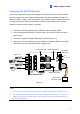
Connect the HD-SDI cameras to the GV-SDI-204 Card using BNC cables.
Using the supplied SATA Power Converter Cable, connect the GV-SDI-204 Card to
power supply.
Connect the supplied Hardware Watchdog Jump Wire (Figure 1-2).
After you turn on the computer, the Power LED (D1) and Status LED (D10 and D18)
should be lit in green to indicate the card is ready for use.
Video 1 ~ 4
Not
Functional
Hardware
Watchdog
Power LED (D1)
Status LED (D10)
Status LED (D18)
SATA Power
Converter Cable
GV-SDI-204 Card
Figure 1-1
Note:
1. The GV-SDI-204 Card only works when the supplied USB Dongle is inserted to PC.
2. The connected HD-SDI cameras must have a resolution under 1080p_30, 720p_60 or
1080i_60. The Video Lost message will be displayed when the connected channels
have higher resolution.