
Operation Manual



P
age
43
of
57
W
ireless
Router
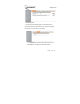
Enble: If this function is enabled, the list will be allowed or blocked
access to the Internet.
Src IP: The IP address of the LAN computer that will be control to the
Internet.
Dst IP: The IP address of the Internet that will be control.
Protocol: Select the protocol type, there are five options: TCP, UDP,
TCP/UDP, IGMP, ALL.
Dst Port: The single port or port range that will be control to the
Internet.
Rule: There are two option, Block and Allow option. If you select Block,
the Router will block the list to access the Internet. If you select Allow,
the Router will Allow the list to access the Internet.
Click Add button to add the list to the table.
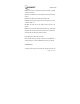
When finished making your change on this tab, click the Ok button to
save this changes, or click the Cancel button to undo your changes.
3.8.3 Block Port
This page is used to filter or block ports form Internet access by Port