
User manual





14
MAINTENANCE
Important:
Pull the mains power plug from the wall socket before carrying out any maintenance tasks
on the file shredder!
When the waste paper container is full, shredded material can be pushed upwards into the
cutting mechanism. Make sure to empty the waste paper container before it is filled
completely.
Clean the exterior of the file shredder with a moist cloth. Ensure that the cloth is kept well
away from the paper feed. This cleaning step is suitable only for the exterior of the device.
The exterior of the device is made of plastic. That is why no solvents like benzene or benzole,
or any organic solvents (e.g. thinner) may be used to clean the exterior of the device. Never
clean the device with a stain remover - this may cause the casing to fade, crack, dissolve or
graze.
Caution:
Make sure that no water gets into the device while cleaning the casing.
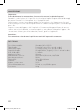
TECHNICAL DATA
Model: Shredder Office X15 CD
Cut type: Particles (paper, CD and credit cards)
Cut size: 2 x 15 mm (paper, CD and credit cards)
Cutting capacity: 15 sheets (A4, 70 g/m²), 1 CD or 1 credit card
Cutting speed: 2.1 m/min
In-feed width: 220 mm
Input voltage: 220-240 V AC/ 50-60 Hz; 3.0A/700W
Power consumption: 500 W
Dimensions: 430 x 350 x 680 mm
Noise level: approx. 58 dB
Waste paper container – volume: 31.5 l
Operating cycle: 10 min. ON/ 45 min. OFF
Net weight: 23 kg
Manual_X15CD_Office.indd 14 15.07.10 15:39