
User manual





5
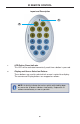
1
L
CD Displa
y
This is a two-line, sixteen-character displa
y
which displa
y
s status in
f
ormation
and is also used to mana
g
e displa
y
/
source routin
g
.
2
N
avigation Button
s
U
sed
f
or routin
g
and ad
j
ustin
g
settin
g
s o
f
the 8x8
C
rosspoint Matrix
f
or HDMI
.
S
ee the in
f
ormation be
g
innin
g
on pa
g
e 11
f
or details on usin
g
these buttons.
3
M
en
u
Press this button to displa
y
routin
g
, switchin
g
mode, and IP address in
f
ormation.
4
I
R Senso
r
R
eceives si
g
nals
f
rom the IR Remote
C
ontrol
.
5
L
ock Indicato
r
This LED turns
g
lows bri
g
ht blue when the
f
ront panel is locked.
6
L
ock Button
Pressin
g
this button temporaril
y
locks the
f
ront panel controls.
7
P
ower Indicato
r
This LED indicator will
g
low bri
g
ht blue when the matrix is powered on.
8
P
ower Button
Press this button to power-on and power-o
ff
the matrix.
9
I
P Control
C
onnect an Ethernet cable to this port to control the 8x8
C
rosspoint Matrix
f
or
H
DM
I
using IP Control. See page 26 for more information.
I
10
R
S-232
C
onnects to the R
S
-232 control device.
S
ee pa
g
e 25
f
or more in
f
ormation.
11
I
R Ex
t
C
onnect an IR extender cable to this port
(G
e
f
en part no. EXT-RMT-EXTIR
)
.
1
2 USB
S
ervice port
f
or manu
f
acturer use onl
y
.
13
Out A - Out
H
C
onnect HDTV displa
y
s to these ports usin
g
HDMI cables.
14
I
n
1
- In 8
C
onnect a Hi-De
f
source to each o
f
these ports usin
g
HDMI cables.
15
2
4V D
C
C
onnect the included 24V D
C
power suppl
y
to this power receptacle and
c
onnect the A
C
power cord to an available electrical outlet.
P
ANEL DESCRIPTION
S