Desktop Computer User's Guide
Manuals
Brands
Gateway Manuals
Desktop
Profile 4
221
222
223
224
225
226
227
228
229
230
215
Replaci
ng the Mini
PC
I card
www
.gatew
a
y
.com
3
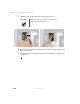
Press outward on both of the retai
ning clips holding
the Mini-PCI
card
until the
card tips up
at an angle.
1
...
...
221
222
223
224
225
...
...
284