
Quick Reference Guide




CHAPTER4: Using Drives and Accessories
54
Viewing the display on a
television
The optional S-Video out jack on your notebook lets you view
your notebook display on a television screen using a standard
S-Video cable.
To view your notebook display on a television:
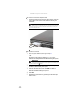
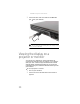
1 With your notebook off, connect one end of a standard
S-Video cable to the optional S-Video out jack on
your notebook.
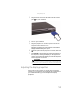
2 Connect the other end of the cable to the Video in jack
on your television or VCR.
3 Turn on the television or VCR.
4 Start your notebook.
Important
To turn on external video by default, connect the television (or other
external video device) before starting your notebook.
Important
Audio is not transmitted through an S-Video out jack. Use the built-in
speakers or a set of headphones or external powered speakers, or connect your
notebook to a stereo system using the headphone jack to hear sound while
playing a DVD. DVD playback to a VCR will be scrambled by copyright protection
software.