
Quick Reference Guide


CHAPTER2: Checking Out Your Notebook
10
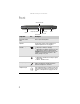
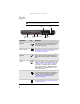
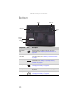
Bottom
Component Icon Description
Hard drive
bay
The hard drive is located in this bay. For more
information, see “Replacing the hard drive kit” on
page 100.
Customer
Care label
Includes the Customer Care contact information. For
more information, see “Gateway contact information”
on page2.
Memory bay Memory modules are located in this bay. For more
information, see “Adding or replacing memory
modules” on page 95.
Battery latch Slide to release the battery. For more information, see
“Changing the battery” on page 61.
Battery Provides power when the notebook is not plugged into
AC power.
Battery lock Slide to unlock the battery. For more information, see
“Changing the battery” on page 61.
Online Support:
Tech Support Phone:
Hours:
Model:
S/No:
Battery latch
Memory
bay
Battery lock
Battery
Customer
care label
Hard drive
bay