Quick Reference Guide
Manuals
Brands
Gateway Manuals
laptops
Gateway NX580
101
102
103
104
105
106
107
108
109
110
CHAPTER
8: Upgrading
Your No
tebook
96
6
Re
mo
ve
th
e
keyb
oa
rd
scr
ew.
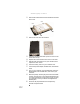
7
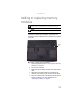
Loo
sen the six memory b
a
y cov
er sc
rew
s (thes
e scr
ew
s
cannot be r
emov
ed)
.
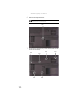
Tip
The sc
re
w hole is marked wit
h a K.
Scr
ew
Scr
ew
Scr
ew
Sc
re
w
Screw
Sc
re
w
Sc
r
ew
1
...
...
100
101
102
103
104
...
...
158