
Quick Reference Guide
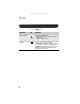
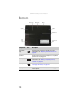
Table Of Contents
- Contents
- About This Reference
- Checking Out Your Notebook
- Setting Up and Getting Started
- Working safely and comfortably
- Connecting the AC adapter
- Connecting the dial-up modem
- Connecting to a broadband modem or network
- Starting your notebook
- Turning off your notebook
- Restarting (rebooting) your notebook
- Using the status indicators
- Using the keyboard
- Using the EZ Pad touchpad
- Adjusting brightness
- Adjusting the volume
- Turning your wireless radio on or off
- Using Drives and Accessories
- Managing Power
- Traveling with Your Notebook
- Maintaining Your Notebook
- Upgrading Your Notebook
- Troubleshooting
- Safety guidelines
- First steps
- Troubleshooting
- Audio
- Battery
- CD drives (external)
- Diskette drive (external)
- Display
- DVD drives (external)
- Ethernet
- File management
- Hard drive
- Internet
- Keyboard
- Media Center
- The Media Center video display looks bad on your TV
- You need to configure your Media Center to output to a TV
- You want to change display settings to get better TV or DVD image quality
- You want to know whether you can burn videos that were recorded with your Media Center computer to a DVD
- You want to know whether you can play recorded videos on other computers
- You want to know whether you can play recorded videos on your home DVD player
- Memory
- Memory card reader
- Modem (cable or DSL)
- Modem (dial-up)
- Your modem does not dial or does not connect
- You cannot connect to the Internet
- Your 56K modem does not connect at 56K
- Your fax communications program only sends and receives faxes at 14,400 bps when you have a 56K modem
- The modem is not recognized by your notebook
- The modem is noisy when it dials and connects
- Mouse
- Networks (wired)
- Networks (wireless)
- You turned wireless networking on, but it takes a while to connect
- Your connection on the network seems intermittent or your wireless network is running slower than you expect
- You are in a wireless network, you can see the network, but cannot communicate, send files, print, or get to the Web
- You are in a wireless network, but no available networks are listed in the Connect to a network dialog box
- Your wireless network is listed as a preferred network, but it has an “x” on it
- Internet Explorer is unable to access the Internet
- You cannot see other computers on your network
- You cannot connect to your network
- Passwords
- PC Cards
- Pointing device
- Power
- Printer
- Sound
- Status indicators
- Touchpad or pointing device
- Video
- Telephone support
- Legal Information
- Index
CHAPTER 2: Checking Out Your Notebook
12
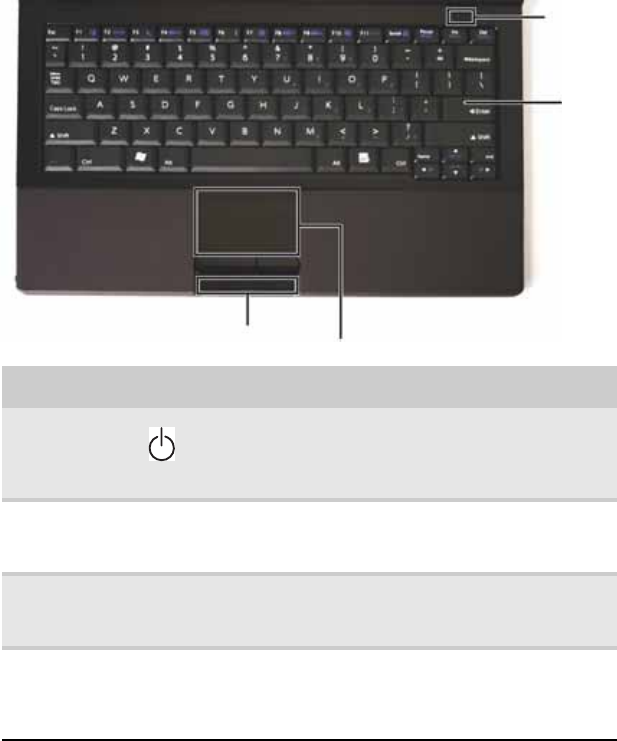
Keyboard area
Component Icon Description
Power button Press to turn the power on or off. You can also
configure the power button for Sleep/Resume mode.
For more information on configuring the power button
mode, see “Changing advanced settings” on page 55.
Keyboard Provides all the features of a full-sized, computer
keyboard. For more information, see “Using the
keyboard” on page 24.
Touchpad Provides all the functionality of a mouse. For more
information, see “Using the EZ Pad touchpad” on
page 28.
Status
indicators
Inform you when a drive is in use or when a button
has been pressed that affects how the keyboard is
used. For more information, see “Using the status
indicators” on page 23.
Status indicators
Power
button
Keyboard
Touchpad