
Owner's Manual


50
www.gateway.com
Chapter 4: Using Drives and Ports
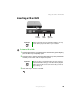
To remove a PC Card:
1 Click the remove hardware icon in the taskbar, the PC Card
name, then click
Stop.
-OR-
Turn off your notebook.
2 Release the eject button by pressing the PC Card eject button once.
3 Eject the PC Card by pressing the eject button again.
Important If the remove hardware icon does not appear on the
taskbar, click the show hidden icons button.