
Owner's Manual




13
www.gateway.com
Back
Back
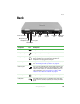
Component Icon Description
Power connector Plug the AC adapter cable into this connector.
Microphone jack Plug a microphone into this jack.
Headphone jack Plug amplified speakers or headphones into this jack. The
built-in speakers are turned off when speakers or
headphones are plugged into this jack.
Modem jack Plug a modem cable into this jack. For more information,
see “Connecting the dial-up modem” on page 26.
Ethernet jack Plug a 10/100/1000 Ethernet network cable into this jack.
The other end of the cable can be plugged into a cable
modem, DSL modem, or an Ethernet network jack. For
more information, see “Connecting to a cable or DSL
modem or to an Ethernet network” on page 27.
Monitor port Plug an analog VGA monitor or projector into this port.
USB ports Plug USB devices (such as a diskette drive, flash drive,
printer, scanner, camera, keyboard, or mouse) into these
ports.
Power connector
Microphone jack
Headphone jack
Modem jack
Ethernet jack
Monitor
port
USB
ports
S-Video
out jack
Ventilation
fan
Kensington
lock slot