CHAPTER 3: Maintaining and Upgrading Your Notebook www.gateway.com
44
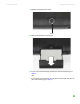
12 Lift the back edge of the keyboard slightly, then carefully push it toward
the LCD panel to release the keyboard retaining tabs. Be careful not to
damage the LCD panel.
13 Lay the keyboard face down on the palm rest.