
Quick Reference Guide




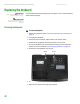


Replacing the keyboard
www.gateway.com
43
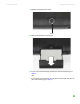
9 Insert the small flat-blade screwdriver under the bottom of each hinge
cover and gently loosen them.
Important
Inserting a piece of cloth between the
screwdriver and keyboard will help
prevent damage to the notebook.
10 Insert the small flat-blade screwdriver under the bottom of the keyboard
cover and gently pry it up.
11 Remove the two keyboard screws.
Screw Screw