
Quick Reference Guide



www.gateway.com
49
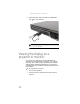
To connect your USB device to your notebook:
1 Connect one end of the USB cable to your device.
2 Connect the other end of the cable to a USB port on
your notebook.
Connecting an IEEE 1394 device
Your notebook may have a 4-pin IEEE 1394 port (also known
as a Firewire® or i.Link® port) for connecting devices such as
a video camera.
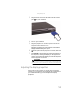
To connect your IEEE 1394 device to your notebook:
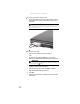
1 Connect one end of the IEEE 1394 cable to your IEEE 1394
device.
Important
For more information about using the IEEE 1394 port on your device, see
your device’s documentation.